
Parts — Orange Pi 5
Orange Pi 5
ReferenceThe Orange Pi 5 is the primary compute platform for Sorter. This page covers hardware selection, memory and storage requirements, and WiFi adapter options.
The Orange Pi 5 is the required compute board for Sorter. The SorterOS image is built on top of the official Ubuntu image provided by Orange Pi for this board.
The Orange Pi 5 is installed and wired during Electronics assembly, where it connects to the Pico controllers and cameras; this page only covers selecting and configuring the board itself.
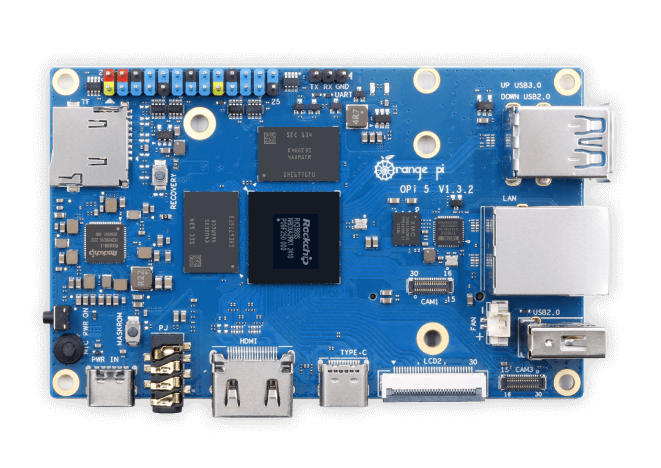
Why the Orange Pi 5
The core reason Sorter requires the Orange Pi 5 is its Rockchip RK3588S SoC, which includes a dedicated neural processing unit (NPU). The NPU is what makes real-time piece classification practical:
- Over 30 fps per camera for YOLO-based piece detection
- Over 100 fps total across all three camera feeds simultaneously
Measured running three sustained NPU inference workers in parallel, one per camera; see Object Detection Research for the full benchmark data.
No other single-board computer at this price point sustains that inference throughput with the NPU required by the detection pipeline.
Recommended configuration
| Component | Requirement |
|---|---|
| Memory | 8 GB+ |
| Storage | 32 GB+ SD card, a name-brand high-endurance one (Samsung PRO Endurance, SanDisk High Endurance or similar) |
The 4 GB variant is not supported — the backend, inference workers, and OS together exceed its available memory.
WiFi
Some Orange Pi 5 variants do not include built-in WiFi. If yours does not, you need one of:
- A Linux-compatible USB WiFi adapter
- An M.2 WiFi module (see below)
M.2 WiFi modules — two different connectors
The Orange Pi family uses two distinct M.2 connector formats depending on the board variant. They are physically incompatible and not interchangeable:
| Board | M.2 interface | Module |
|---|---|---|
| Orange Pi 5 (original) | Standard M.2 PCIe | AP6275P (Wi-Fi 6 + BT5.0) — Amazon |
| Orange Pi 5 Plus | PCIe M.2 E-KEY | R6 module (Wi-Fi 6 + BT5.2, 1201 Mbps) — Amazon |
If you order the wrong module for your board variant it will not physically seat. Double-check which board you have before purchasing.
Telling the two slots apart by eye: both are the same width and length, but the keying notch (the gap cut into the row of gold contacts) is in a different place. On the original Orange Pi 5's Standard M.2 PCIe (M-key) slot, the notch sits close to one end of the contact row. On the Orange Pi 5 Plus's E-key slot, the notch sits nearer the middle of the row. The module you buy has a matching notch, so a module only physically seats in the slot it's keyed for, and that mismatch is the fastest way to confirm which one you have before ordering.
Installing the module
Preparing the Orange Pi is the procedure. Do it while the board is still loose on the bench, before it goes into its housing: the slot, the retention screw and the antenna leads are all on the underside of the board, and the housing's base sits under the board.
The AP6275P module for the original Orange Pi 5 requires drivers included in the official Orange Pi Ubuntu image. It works on the SorterOS image (which is based on it) but may not work on other third-party OS images out of the box.
USB hubs
Use a powered USB hub for webcams, Raspberry Pi Picos, and other attached USB devices. We have seen bus-powered hubs let those devices brown out the Orange Pi 5 under load, which can trigger severe system crashes instead of a clean USB disconnect.
Cooling
If the Orange Pi 5 is pinned hard, especially when running a detection model on the CPU, it can heat up enough to hit thermal emergency shutdown at about 105 C. A small 5V fan (e.g. a 30-40mm USB or GPIO-powered fan) mounted over the SoC is recommended. The intent is to run models on the NPU; if a bug or fallback pushes them onto the CPU, this can happen.