
SorterOS — Operations
Shutting down the machine
How-to guideTwo proper ways to power the machine down, and why pulling the plug is a last resort.
SorterOS changes quickly. This page describes what each step does, but a button's name, or where it is, may have changed since this page was written, so it keeps screenshots to a minimum.
The machine's computer writes files continuously while it runs. Cutting power mid-write can corrupt those files and leave the machine unable to start. Use one of the two shutdowns below, then cut power.
Option 1: from the UI
Click the ⋯ menu at the top right of the UI and select Power down the machine. Press Power down the machine again to confirm.
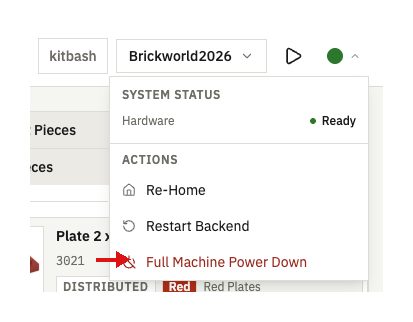
The UI then shows Powering down and stays on that screen, even after the machine is off and even if you unplug it. It never tells you the shutdown has finished, so watch the board instead (below).
Option 2: the button on the Orange Pi
Press the small black button on the side of the Orange Pi once (circled below). That begins the shutdown procedure.

Knowing it has finished
With either option, the full shutdown takes about a minute and a half. It has finished when the red and green lights on the Orange Pi have stopped blinking. Wait for that before flipping the switch or unplugging the machine.
Cutting power directly
Flipping the power switch or pulling the plug while the machine is running skips the shutdown entirely. Any file being written at that instant can be corrupted, and the machine may not start again until it is serviced.
Cut power directly only in an emergency (a jam you cannot stop, smoke, anything unsafe). It is an emergency stop, not a shutdown.